
DIY Tumbler Designs: Best SVG Files and Techniques
 28 min read
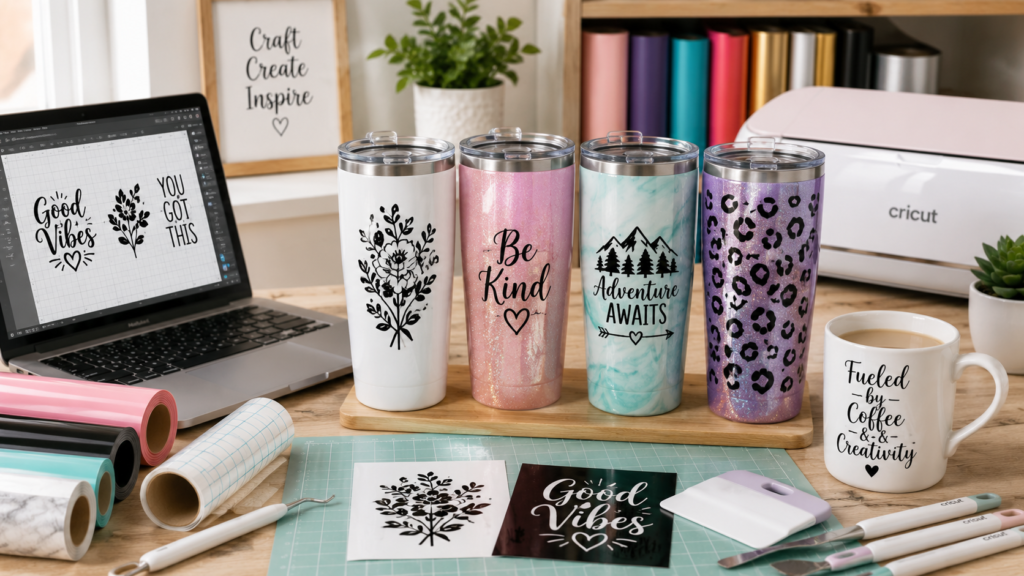
Custom tumblers are one of the most popular crafting projects right now — and for good reason. A well-made tumbler with a beautiful vinyl design or full epoxy wrap turns a $5 blank into a $30–$50 finished product that people genuinely love receiving as gifts. Whether you’re making one for yourself, creating personalized gifts, or building a tumbler business on Etsy, the process starts with a great SVG design and the right technique.
The beauty of tumbler crafting is that there are multiple methods to choose from. You can apply adhesive vinyl for a clean, simple look. You can use heat transfer vinyl (HTV) for designs that wrap around curved surfaces. Or you can go full custom with sublimation prints sealed under epoxy resin for that glossy, professional, pour-painted look. Each method uses SVG files differently, and this guide covers all of them.
This post walks you through everything: the supplies you need, how to choose and prepare SVG files for tumblers, step-by-step application techniques for each vinyl type, the epoxy sealing process, and the most common mistakes that ruin tumbler projects. Let’s build your first stunning tumbler.
📋 Table of Contents
- Why Custom Tumblers Are Worth Making
- Complete Supply List for DIY Tumblers
- 3 Methods for Applying Designs to Tumblers
- How to Choose the Right SVG Files for Tumblers
- Tumbler Sizing Guide — Getting the Dimensions Right
- Method 1: Adhesive Vinyl Tumbler Tutorial
- Method 2: Heat Transfer Vinyl (HTV) Tumbler Tutorial
- Method 3: Sublimation + Epoxy Tumbler Tutorial
- How to Create Full Wrap Tumbler Designs with SVG Files
- 20 Popular DIY Tumbler Design Ideas
- 10 Common Tumbler Mistakes and How to Fix Them
- Can You Sell Custom Tumblers? Business Tips
- Frequently Asked Questions
Why Custom Tumblers Are Worth Making
Tumblers sit in a sweet spot for crafters. They’re practical items that people actually use daily, they’re highly giftable, and the profit margins for sellers are excellent. A 20oz skinny tumbler blank costs between $3–$8, a sheet of vinyl runs about $1–$2, and the finished product sells for $25–$50+ depending on the complexity of the design and finish.
Beyond the economics, tumblers are creatively satisfying. The curved surface creates a unique design challenge compared to flat projects like t-shirts or signs. You get to work with different materials — adhesive vinyl, HTV, glitter, epoxy resin — and the finished product is something tangible that you or your customer will carry around every day.
The craft tumbler market has exploded over the past few years. Stanley cups, YETI dupes, and the “emotional support water bottle” trend have made customized drinkware one of the hottest categories on Etsy, at craft fairs, and in Facebook marketplace groups. If you’ve been looking for a craft project that’s both fun to make and profitable to sell, tumblers are hard to beat.
Complete Supply List for DIY Tumblers
What you need depends on which method you’re using. Here’s the complete list covering all three main approaches, so you can pick the supplies that match your chosen technique.
🛒 Essential Supplies (All Methods)
- Cricut or Silhouette cutting machine — Maker 3, Explore 3, Cameo 4, or equivalent
- Blank tumblers — 20oz skinny tumblers are the most popular; also 30oz, 40oz Stanley-style
- SVG design files — from PickSVG or your own creations
- Rubbing alcohol (90%+) — for cleaning tumbler surface before application
- Lint-free cloth — microfiber works perfectly
- Measuring tape — flexible fabric type for measuring circumference
- Painter’s tape — for positioning and hinge method
- Scraper/squeegee tool — for smoothing vinyl onto curved surfaces
🎨 For Adhesive Vinyl Method
- Permanent adhesive vinyl — Oracle 651 or Cricut Premium Vinyl (Permanent)
- Transfer tape — StandardGrip for most designs; StrongGrip for glitter vinyl
- Weeding tools — hook weeder and tweezers
- StandardGrip cutting mat (green)
🔥 For HTV Method
- Heat transfer vinyl — Siser EasyWeed or Cricut Everyday Iron-On
- Heat gun or small heat press — a Cricut Mug Press works for straight tumblers
- Heat-resistant tape — to hold HTV in place during pressing
- Silicone wrap or heat-resistant sleeve — for even pressure on curves
✨ For Epoxy / Sublimation Method
- Epoxy resin — specifically formulated for tumblers (UV-resistant)
- Turner/rotisserie motor — keeps the tumbler spinning while epoxy cures
- Mixing cups and stir sticks — for accurate resin mixing
- Heat gun or torch — to pop air bubbles in epoxy
- Sublimation printer + paper (optional) — for full-color photo designs
- Shrink wrap — to press sublimation prints onto the tumbler
3 Methods for Applying Designs to Tumblers
Each method produces a different look and has different durability characteristics. Understanding the differences helps you choose the right approach for each project.
| Method | Best For | Durability | Difficulty | Cost Per Tumbler |
|---|---|---|---|---|
| Adhesive Vinyl | Text, logos, simple designs | Good (hand-wash recommended) | Beginner | $1–$3 |
| HTV (Heat Transfer) | Curved wraps, stretchy designs | Very Good (dishwasher safe) | Intermediate | $2–$5 |
| Sublimation + Epoxy | Full-color photos, gradient art, premium finish | Excellent (permanent, sealed) | Advanced | $5–$12 |
Adhesive vinyl is the fastest method. You cut your SVG design, weed the excess, apply transfer tape, and stick it directly onto the tumbler. The design sits on top of the surface, which means you can feel it slightly when you run your finger over it. This is perfectly fine for most projects and is by far the most beginner-friendly approach.
Heat transfer vinyl (HTV) bonds to the tumbler surface using heat, which creates a more permanent and smoother finish than adhesive vinyl. HTV works especially well for designs that need to wrap around the full circumference of the tumbler because the heat allows the vinyl to conform to curves. The trade-off is that you need a heat source that can apply even heat to a curved surface — either a heat gun with a silicone sleeve, a convection oven technique, or a Cricut Mug Press (for straight-walled tumblers).
Sublimation with epoxy is the premium method. The design is printed using special sublimation ink, transferred to the tumbler with heat, and then sealed under multiple coats of crystal-clear epoxy resin. The result is a glossy, smooth, ultra-durable tumbler that looks professionally manufactured. This method allows for full-color, photographic designs that vinyl can’t replicate. It’s the most time-intensive (epoxy curing takes 24+ hours) but produces the highest-value finished product.
How to Choose the Right SVG Files for Tumblers
Not every SVG file works well on a tumbler. The curved surface, limited vertical space, and wraparound visibility create specific design requirements that you should keep in mind when selecting files.
What Makes a Good Tumbler SVG
Horizontal orientation works best. Tumblers are wider than they are tall (in terms of visible design area), so designs that spread horizontally — like text banners, landscape scenes, and wide motifs — look much better than tall, vertical designs.
Bold, simple elements are easier to weed and apply. Extremely fine lines, tiny text under 0.5 inches, and intricate details with thin bridges between cuts are difficult to weed and harder to apply smoothly on a curved surface. Look for SVG designs with thicker lines and well-spaced elements.
Consider the wrap. A design that looks great on a flat screen may look completely different when wrapped around a cylinder. The edges of the design curve away from the viewer, so the most important elements should be concentrated in the center of the design where they’ll be most visible when someone is holding the tumbler.
Multi-layer SVGs offer color variety. SVG files with separate layers for each color let you cut different vinyl colors and layer them on the tumbler, creating multi-color designs that really pop. PickSVG includes layered SVG files with every download, making multi-color tumbler projects straightforward.
Best SVG Design Categories for Tumblers
| Category | Examples | Works Best With |
|---|---|---|
| Motivational Quotes | “But First, Coffee” / “Stay Hydrated” / “Boss Babe” | Adhesive vinyl, single color |
| Floral & Botanical | Wildflower wraps, sunflower borders, botanical rings | Full wraps, multi-layer vinyl |
| Monograms & Names | Split monograms, script names, circle frames | Adhesive vinyl, glitter vinyl |
| Seasonal & Holiday | Christmas snowflakes, Halloween skulls, fall leaves | Any method, layered designs |
| Mom / Dad / Teacher Life | “Mama Bear” / “Teacher Fuel” / “#DadLife” | Adhesive or HTV, bold fonts |
| Sports & Teams | Team logos, jersey numbers, game day text | Multi-layer vinyl, team colors |
| Animal & Pet Designs | Dog mom, cat silhouettes, paw prints | Single or multi-color vinyl |
| Profession-Themed | “Nurse Life” / “Lawyer Fuel” / “Scrub Life” | Adhesive vinyl, bold designs |
🎨 Ready to Find Your Perfect Tumbler Design?
Browse hundreds of tumbler-ready SVG files — all with commercial use licenses, layered designs, and instant download in SVG, PNG, DXF, EPS, and PDF formats.
Browse Tumbler SVG Collections →Tumbler Sizing Guide — Getting the Dimensions Right
Getting your design size right is critical. Cut too small and the design looks lost on the tumbler. Cut too large and it won’t fit, or it’ll wrap in ways you didn’t intend. Here are the standard dimensions for the most popular tumbler sizes.
| Tumbler Size | Circumference | Design Area (H × W) | Full Wrap Size |
|---|---|---|---|
| 20oz Skinny | ~9.5 inches | 3.5″ H × 8″ W (front only) | 8.5″ H × 9.25″ W |
| 20oz Tapered | ~10.5″ (top) / ~8.5″ (bottom) | 4″ H × 8″ W (front) | Tapered template required |
| 30oz Skinny | ~9.8 inches | 4.5″ H × 8.5″ W (front) | 9.5″ H × 9.5″ W |
| 40oz Stanley-style | ~12.5 inches | 5″ H × 10″ W (front) | Varies — measure yours |
| 12oz Wine Tumbler | ~10 inches (widest) | 3″ H × 4″ W (front) | Curved template required |
For front-only designs (the most common approach), your design should cover roughly 40–50% of the tumbler’s circumference. This ensures the design is clearly visible when someone is holding the tumbler naturally. On a 20oz skinny tumbler with a 9.5-inch circumference, that means a design width of about 4–5 inches for a centered front design.
For full wrap designs, your SVG needs to span nearly the entire circumference with a small overlap zone (usually 0.25 inches) where the beginning and end of the wrap meet. Full wraps look incredible but require more precise measuring and careful application to avoid bubbles and misalignment at the seam.
Method 1: Adhesive Vinyl Tumbler Tutorial
This is the most beginner-friendly method and produces clean, professional-looking results. Here’s the complete step-by-step process for applying adhesive vinyl to a tumbler using your Cricut or Silhouette.
Step-by-Step: Adhesive Vinyl Application
- Clean the tumbler thoroughly. Wipe the entire surface with rubbing alcohol (90% or higher) and a lint-free cloth. This removes oils, dust, and any factory coatings that would prevent the vinyl from sticking. Let it dry completely — do not touch the surface after cleaning.
- Upload and size your SVG in Design Space (or Silhouette Studio). Upload your SVG file, resize it to match your tumbler measurements, and position the design on the canvas. For Cricut, make sure you select “Vinyl” as your material. Do not mirror adhesive vinyl — that’s only for HTV.
- Cut the design. Place your permanent adhesive vinyl face-up (color side up) on the cutting mat. Load the mat and cut. Let the machine finish completely before unloading.
- Weed the excess vinyl. Use a weeding tool to carefully remove all the vinyl you don’t want on the tumbler — the negative space around and inside your design. Take your time with small details. Good lighting and a bright weeding background help tremendously.
- Apply transfer tape. Cut a piece of transfer tape slightly larger than your design. Peel the backing and apply the sticky side down onto your weeded vinyl. Use a scraper tool to burnish (press firmly) the transfer tape onto the vinyl, making sure every part of the design adheres to the tape.
- Position the design on the tumbler. Peel the transfer tape (with the vinyl design attached) away from the vinyl backing. Use a piece of painter’s tape across the top edge to create a hinge — this lets you position the design, lift it to check placement, and lay it down precisely where you want it.
- Apply and burnish. Starting from the center and working outward, press the vinyl onto the tumbler surface using your fingers or a scraper. Work slowly on curved areas, applying firm pressure to push out air bubbles and conform the vinyl to the surface. Pay special attention to the edges.
- Remove the transfer tape. Slowly peel the transfer tape away at a sharp angle (almost folding it back on itself). If any part of the design lifts with the tape, press it back down, burnish again, and try peeling more slowly. For stubborn designs, wait 30 minutes before removing the tape.
Method 2: Heat Transfer Vinyl (HTV) Tumbler Tutorial
HTV creates a smoother, more durable bond than adhesive vinyl because the heat-activated adhesive actually melts into the surface. This method is especially popular for tumblers that will be used daily and washed frequently.
Step-by-Step: HTV Application on Tumblers
- Clean the tumbler with rubbing alcohol. Same as the adhesive method — this step is non-negotiable for both methods. A clean surface is essential for proper adhesion.
- Upload, size, and MIRROR your SVG design. This is the critical difference from adhesive vinyl. HTV is placed face-down during cutting, so you must mirror (flip horizontally) your design in Design Space or Silhouette Studio before cutting. If you skip this step, text will appear backwards on your tumbler.
- Cut the HTV. Place the HTV shiny/liner side down on the cutting mat (the colored side faces up). Select your HTV material setting and cut. The machine cuts through the vinyl layer but not through the clear carrier sheet underneath.
- Weed the design. Remove the excess HTV from around your design. The design remains on the clear carrier sheet. Weed while the HTV is still on the mat for easier handling.
- Position the design on the tumbler. Place the weeded HTV (still on its carrier sheet) onto the tumbler with the design touching the tumbler surface. Secure with heat-resistant tape so it doesn’t shift during pressing.
- Apply heat. This is where tumblers differ from flat projects. You have several options for applying heat to a curved surface — see the heat methods table below.
| Heat Method | Temperature | Time | Best For |
|---|---|---|---|
| Heat gun + silicone sleeve | 300–315°F | 30–45 seconds per section | All tumbler shapes |
| Cricut Mug Press | Auto (380°F) | ~6 minutes | Straight-walled tumblers only |
| Convection oven | 300°F | 4–5 minutes | Any shape (careful monitoring needed) |
| Flat heat press + silicone pad | 305°F | 15 seconds per section | Front-only designs on flat areas |
After applying heat, let the tumbler cool for about 30 seconds, then carefully peel the carrier sheet. If using a “warm peel” HTV, peel while still slightly warm. For “cold peel” varieties, wait until the tumbler is completely cool. Check your specific HTV brand’s instructions — this varies.
Method 3: Sublimation + Epoxy Tumbler Tutorial
This is the premium method that produces those stunning, glossy, professional-grade tumblers you see selling for $40–$60+ on Etsy. The design is infused into the surface (not sitting on top of it), and the epoxy creates a glass-like, ultra-smooth protective finish.
What You Need to Know About Sublimation
Sublimation requires a special printer (converted Epson EcoTank or dedicated sublimation printer) that uses sublimation ink instead of regular ink. The ink is printed onto sublimation paper, placed against the tumbler, and heated to 385–400°F. At that temperature, the ink turns into a gas and permanently bonds with the polyester coating on the tumbler surface.
SVG files are used differently for sublimation. Instead of cutting vinyl shapes, you use the SVG (or PNG) design as a full-color print template. The design is printed at the exact dimensions of your tumbler wrap, applied with shrink wrap or heat-resistant tape, and sublimated in a convection oven or with a tumbler press.
Step-by-Step: Epoxy Tumbler Finish
- Start with your design already applied. Whether you used sublimation, adhesive vinyl, or even spray paint and glitter, the base design should be fully complete and dry before applying epoxy.
- Mix the epoxy resin. Follow your resin brand’s exact ratio (usually 1:1 by volume). Mix thoroughly for 3–5 minutes. Scrape the sides and bottom of the mixing cup. Under-mixed epoxy will leave sticky, uncured spots.
- Mount the tumbler on the turner. Secure the tumbler horizontally on a cup turner / rotisserie motor. Turn it on and make sure it spins evenly without wobbling.
- Apply the first coat of epoxy. While the tumbler spins, drizzle a thin, even line of mixed epoxy along the length of the tumbler. Use a gloved finger or a foam brush to spread it evenly. The spinning motion will help distribute the epoxy, but you need to guide it for even coverage.
- Pop air bubbles. Use a heat gun or small torch (held 6+ inches away) to quickly pass over the wet epoxy surface. Bubbles will pop on contact. Don’t hold the heat in one place — quick passes only.
- Let it cure while spinning. Keep the tumbler spinning on the turner for the full cure time (usually 12–24 hours depending on the epoxy brand). The spinning prevents drips and ensures an even finish.
- Sand and apply a second coat (optional but recommended). For a truly flawless finish, lightly sand the cured first coat with 220-grit sandpaper, wipe clean, and apply a second coat following the same process. Two coats gives a deeper, more glass-like finish.
How to Create Full Wrap Tumbler Designs with SVG Files
Full wrap designs cover the entire circumference of the tumbler, creating a seamless all-around pattern. These are the most visually impressive tumbler designs but require precise measurements and careful application.
Preparing a Full Wrap SVG
Step 1: Measure your tumbler exactly. Wrap a flexible tape measure around the widest point to get the circumference. Measure the height of the design area (the flat section between the top rim and the bottom curve). Write these numbers down.
Step 2: Size your SVG to match. In Design Space or Silhouette Studio, resize your SVG so the width equals your tumbler’s circumference minus 0.25 inches (for the seam overlap) and the height matches your measured design area. For a 20oz skinny tumbler, this is typically about 9.25″ wide × 8.5″ tall.
Step 3: Use a full wrap SVG template. Many SVG designers create files specifically sized for common tumbler dimensions. These full wrap SVG templates take the guesswork out of sizing. When you download tumbler-specific designs from PickSVG, the files are often pre-sized or include sizing guidelines for popular tumbler blanks.
Step 4: Apply with the hinge method. For full wraps, align one edge of the design vertically on the tumbler and tape it down as a hinge. Slowly roll the tumbler while pressing the vinyl down, working out air bubbles as you go. When you reach the other end, the edges should overlap by about 0.25 inches for a clean seam.
20 Popular DIY Tumbler Design Ideas
Need inspiration? Here are the most popular and best-selling tumbler design categories right now. Each of these works beautifully with SVG files from PickSVG.
🔥 Trending Tumbler Design Ideas
1. “But First, Coffee” — a classic that never stops selling
2. Floral full wrap — wildflowers, sunflowers, or roses wrapping around the entire tumbler
3. Glitter + vinyl combo — glitter base with a vinyl monogram or quote on top
4. “Mama Bear” or “Mom Fuel” — the #1 best-selling gift category for tumblers
5. Profession tumblers — “Nurse Life,” “Teacher Fuel,” “Lawyer Powered by Coffee”
6. Sports team colors + logo — game day tumblers in team colors
7. Bridesmaid proposal tumblers — personalized with each name
8. Pet parent designs — “Dog Mom” with paw prints or breed silhouettes
9. Bible verse tumblers — Psalm 46:5, Proverbs 31:25, Philippians 4:13
10. Iced coffee aesthetic — trendy retro fonts with coffee-themed quotes
11. Country/western designs — cowhide patterns, boots, rodeo themes
12. Leopard print full wraps — still one of the most requested patterns
13. Greek life tumblers — sorority letters, symbols, and chapter names
14. Seasonal rotation — pumpkin spice (fall), snowflakes (winter), florals (spring)
15. Kids’ character tumblers — for school lunch boxes and car rides
16. Birthday queen/king — “Birthday Girl” with crown SVG designs
17. Gym/fitness motivation — “Hydrate or Diedrate,” water tracker markings
18. Coordinate tumblers — GPS coordinates of a meaningful location
19. Matching couple tumblers — “His” and “Hers” or “Hubby” and “Wifey”
20. Boho/celestial — moon phases, sun and moon combos, minimalist line art
🎨 Find All These Designs and More
PickSVG has hundreds of tumbler-perfect SVG designs across every category above — quotes, florals, monograms, seasonal, professions, and more. Every file includes commercial use licensing.
Shop Tumbler SVG Designs →10 Common Tumbler Mistakes and How to Fix Them
Even experienced crafters run into issues with tumbler projects. Here are the most common problems and how to prevent or fix them.
❌ Mistake 1: Not cleaning the tumbler surface
The most common cause of vinyl peeling off within days. Tumblers come from the factory with oils, coatings, and residue that prevent adhesion. Fix: Always clean with 90%+ rubbing alcohol before any application. Don’t use soap — it can leave a film.
❌ Mistake 2: Using removable vinyl instead of permanent
Removable vinyl (Oracle 631, Cricut Removable) is designed to peel off easily. It will not survive daily use, condensation, or washing on a tumbler. Fix: Always use permanent adhesive vinyl — Oracle 651 or Cricut Premium Vinyl (Permanent).
❌ Mistake 3: Forgetting to mirror HTV designs
You cut a beautiful design, apply it, peel the carrier sheet, and the text is backwards. This happens to everyone at least once. Fix: Always mirror your design before cutting HTV. Create a checklist or sticky note on your machine as a reminder.
❌ Mistake 4: Air bubbles under the vinyl
Rushing the application process creates trapped air pockets that look unprofessional. Fix: Apply vinyl slowly from one side to the other using the hinge method. Use a scraper tool with firm, overlapping strokes. For small remaining bubbles, poke with a fine needle and press flat.
❌ Mistake 5: Wrong design size
A design that’s too big wraps awkwardly; too small looks lost on the tumbler. Fix: Measure your specific tumbler every time. Don’t assume all 20oz tumblers are the same — they vary by brand. Use the sizing chart earlier in this post as a starting reference, then adjust to your blank.
❌ Mistake 6: Epoxy drips and uneven coating
Applying too much epoxy at once or not spinning the tumbler consistently creates thick drips and thin spots. Fix: Apply thin coats. Keep the turner running for the full cure time. Apply multiple thin coats rather than one thick one.
❌ Mistake 7: Epoxy bubbles that won’t pop
Small bubbles trapped in the epoxy ruin an otherwise beautiful finish. Fix: Use a heat gun or torch (quick passes, 6+ inches away) immediately after applying. Check again 15 minutes later and pop any new bubbles. Working in a warm room (70°F+) reduces bubbles.
❌ Mistake 8: Design peeling at the edges
The edges of vinyl designs on tumblers are the most vulnerable to peeling, especially on curved surfaces. Fix: Press extra firmly on all edges. Seal the edges with a thin coat of Mod Podge or clear vinyl sealant. For HTV, make sure you applied enough heat to the edges specifically.
❌ Mistake 9: Using low-resolution images instead of SVG files
JPEG and low-res PNG files cut with jagged edges and lose detail when scaled. Fix: Always use SVG files for cutting projects. SVGs are vector-based, so they scale to any size without losing quality. PickSVG includes SVG files with every design download.
❌ Mistake 10: Not using commercial-licensed designs for tumblers you sell
Selling tumblers with designs that only have a personal use license can result in legal issues and marketplace takedowns. Fix: Only use SVG files with a commercial use license for any tumbler you plan to sell. All designs from PickSVG include commercial licensing.
Can You Sell Custom Tumblers? Business Tips
Custom tumblers are one of the most profitable craft items you can sell. The margins are strong, the demand is consistent year-round, and reorders are common (customers who love their tumbler come back for gifts, team orders, and seasonal designs).
Where to Sell Custom Tumblers
Etsy is the biggest marketplace for custom tumblers. Search “custom tumbler” on Etsy and you’ll find thousands of shops doing steady business. The key to standing out is having unique designs, high-quality photos, and fast turnaround times.
Facebook Marketplace and local craft groups are excellent for building a local customer base. Many successful tumbler makers start by posting in local buy/sell groups and taking custom orders. The advantage of local sales is no shipping — customers pick up or you deliver, which protects the tumbler from shipping damage.
Craft fairs and markets are where tumbler businesses really take off. People love seeing the finished product in person, and impulse purchases are common. Bring a variety of designs and offer on-the-spot personalization (adding names with vinyl) for an upsell.
Your own website or Instagram shop gives you full control over pricing and branding. As your business grows, having your own storefront (Shopify, WooCommerce, or Big Cartel) reduces platform fees and builds brand loyalty.
Pricing Your Custom Tumblers
| Tumbler Type | Material Cost | Suggested Retail Price | Profit Margin |
|---|---|---|---|
| Vinyl decal only (20oz) | $4–$7 | $20–$30 | ~75% |
| Glitter + vinyl (20oz) | $8–$12 | $30–$40 | ~70% |
| Epoxy resin tumbler (20oz) | $10–$18 | $40–$55 | ~65% |
| Sublimation + epoxy (20oz) | $12–$20 | $45–$65 | ~65% |
| Custom name add-on | $0.50 | $5–$8 | ~90% |
Licensing matters when you sell. Every SVG design you use on tumblers you sell must come with a commercial use license. Personal use licenses only cover items you make for yourself or give as gifts — not products you sell for profit. PickSVG includes commercial use licensing with every design, so you’re covered from day one.
Frequently Asked Questions
What is the best vinyl for tumblers?
For adhesive vinyl tumblers, Oracle 651 and Cricut Premium Vinyl (Permanent) are the most popular and reliable choices. They have strong adhesion that holds up to daily use, condensation, and hand washing. For HTV tumblers, Siser EasyWeed and Cricut Everyday Iron-On work well. Always use permanent vinyl — never removable — for any drinkware project.
Can you put vinyl tumblers in the dishwasher?
It depends on the method. Adhesive vinyl tumblers should be hand-washed only — the high heat and harsh detergents in dishwashers will break down the adhesive over time. HTV tumblers are more dishwasher-resistant but will last longer with hand washing. Epoxy-sealed tumblers are the most durable and can generally survive the top rack of a dishwasher, though hand washing is still recommended to preserve the finish long-term.
Do I need a special machine to make custom tumblers?
You need a cutting machine like a Cricut (Maker, Explore, Joy) or Silhouette (Cameo, Portrait) to cut vinyl designs from SVG files. For adhesive vinyl tumblers, that’s all the equipment you need beyond basic supplies. For HTV, you’ll also need a heat source (heat gun, mug press, or oven). For epoxy tumblers, you’ll need a cup turner. You don’t need all three methods to start — pick one and expand later.
How do I make a full wrap tumbler design?
Measure your tumbler’s exact circumference and design area height. Size your SVG design to match those dimensions (subtract 0.25″ from the width for a seam overlap). Cut the design, weed it, and apply starting from one edge using the hinge method — taping one side down and slowly rolling the tumbler while pressing the vinyl into place. Full wrap SVG templates sized for common tumbler dimensions are available from PickSVG.
What type of blank tumbler should I buy?
For most DIY projects, 20oz skinny stainless steel tumblers are the most versatile and popular. They’re affordable in bulk ($3–$6 each), available in many colors, and fit standard cup holders. For sublimation, you need tumblers with a polyester or polymer coating — look for “sublimation-ready” blanks. Popular brands include Maars, HOGG, and MakerFlo. Buy from craft supply wholesalers for the best per-unit pricing.
How long does it take to make one custom tumbler?
An adhesive vinyl tumbler takes about 20–30 minutes from start to finish (cleaning, cutting, weeding, applying). HTV tumblers take 30–45 minutes because of the heating step. Epoxy tumblers take 30–60 minutes of active work plus 12–24 hours of curing time on the turner. If you’re doing a second epoxy coat, add another full cure cycle. Batch production (making 5–10 at once) is significantly more efficient.
Can I use SVG files with a Silhouette machine for tumblers?
Yes. SVG files work with both Cricut (Design Space) and Silhouette (Silhouette Studio — Designer Edition or higher required for SVG import). The process is nearly identical: upload the SVG, resize it to your tumbler dimensions, set your material, and cut. The main difference is the software interface. PickSVG provides files in SVG, PNG, DXF, EPS, and PDF formats to ensure compatibility with all major cutting machines.
How do I seal vinyl on a tumbler to make it more durable?
For adhesive vinyl tumblers, you can seal the edges with a thin layer of dishwasher-safe Mod Podge or Krylon UV-Resistant Clear Coating spray. Apply 2–3 thin coats, letting each dry completely. For maximum durability, apply a full epoxy resin coat over the vinyl — this creates a glass-smooth, waterproof finish that makes the tumbler virtually indestructible. Just make sure the vinyl is fully pressed down with no air bubbles before applying any sealant.
Why is my vinyl not sticking to my tumbler?
The most common causes are: the surface wasn’t cleaned properly (use 90%+ rubbing alcohol), you’re using removable vinyl instead of permanent, the tumbler has a powder-coated finish that needs extra surface prep, or the vinyl wasn’t pressed firmly enough — especially at the edges and curves. Temperature also matters: cold vinyl adheres poorly. If you’re working in a cold room, warm the tumbler slightly (with a heat gun or warm water) and let the vinyl reach room temperature before applying.
Do I need a commercial license to sell tumblers with SVG designs?
Yes. If you’re selling tumblers (even on a small scale at craft fairs or to friends), you need SVG designs with a commercial use license. Personal use licenses only cover items you make for yourself or give as gifts. Using personal-use designs on products you sell violates the license and can lead to legal action or marketplace takedowns. All SVG files from PickSVG include commercial use licenses, so you can sell confidently.
Start Making Stunning Custom Tumblers Today
Custom tumblers are one of the most rewarding craft projects you can take on. The combination of creative design, hands-on application, and a functional finished product makes tumbler crafting addictive — once you make one, you’ll want to make ten. And if you decide to sell them, the profit margins and demand make it one of the best craft business niches going.
Start with the adhesive vinyl method — it’s the simplest, fastest, and cheapest way to make a beautiful custom tumbler. As you get comfortable, experiment with HTV for more durable results, and eventually try epoxy finishing for that premium, glossy look that commands top dollar.
The foundation of every great tumbler is a great design. Browse PickSVG’s tumbler-ready SVG collections to find professionally designed files with commercial use licenses, all five file formats, and instant download. From motivational quotes and florals to monograms, seasonal designs, and profession-themed graphics — your next custom tumbler starts with the perfect SVG.
Now go make something beautiful. 🥤

More like this
 SVG Craft Projects
Greek Life Crafting: Sorority & Fraternity DIY Gifts, Shirts & Ideas
Greek life runs on tradition — and few traditions are as beloved as making something with your letters on it.…
 SVG Craft Projects
Personalized Gift Ideas Using Your Cricut Machine
There’s something about a personalized gift that store-bought stuff just can’t touch. You know what I mean — that moment…
 SVG Craft Projects
How to Make Custom T-Shirts with Cricut: Step-by-Step Guide 2026
Making custom t-shirts with a Cricut is one of those projects that gets people genuinely excited about their cutting machine.…