
Download
Checkout
License
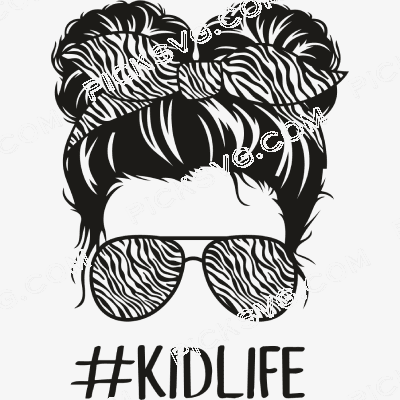
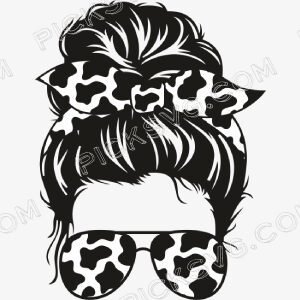
Zebra KidLife Black Svg
Quantity Discounts
| Quantity* | Price |
| 2 - 5 | $2.51 |
| 6 - 10 | $2.43 |
| 11 - 19 | $2.28 |
| 20 - 34 | $2.18 |
| 35 + | $1.94 |
*Quantity refers to discounted items (products with discount) individual count on cart.
Overview
Zebra KidLife Black SVG — Single-Color Kids Animal Cut File for Cricut & Silhouette
Zebra KidLife Black SVG delivers the zebra-themed Kid Life design in a bold single-color black rendition — the production-efficient format that serves the HTV and vinyl workflow at maximum speed for the children’s apparel and family matching set market. The zebra is a commercially compelling animal choice for a KidLife design because it carries a distinctive visual identity — the high-contrast black-and-white stripe pattern is immediately recognizable and graphically striking — that creates finished apparel products with a fashion-forward, editorial quality that typical cartoon animal designs rarely achieve. A child wearing a black zebra KidLife shirt is wearing something that reads as intentionally styled rather than generically cute, which appeals to the significant segment of modern parents who bring their own strong aesthetic sensibilities to their children’s clothing choices.
The single-color black treatment amplifies the zebra’s natural aesthetic strength. Unlike most animals where color is the primary identifier, the zebra is defined by its pattern contrast — and a bold black rendering captures exactly the high-contrast character that makes the zebra visually distinctive without requiring multi-layer color complexity. The black single-color application cuts as a single layer in seconds, weeds cleanly, and applies with maximum efficiency across children’s HTV production workflows. That production simplicity is genuine commercial value during the family matching set order rushes that characterize the Mother’s Day, Easter, and holiday seasons when coordinated family animal apparel sees its highest demand peaks.
The KidLife design’s relationship to its matching Zebra MomLife parent design is the primary commercial engine driving purchase behavior in this product family. The “”Mom Life / Kid Life”” paired design format is one of the highest-converting structures in family apparel because it creates a cross-product discovery moment — a parent who finds the KidLife design immediately searches for the matching MomLife version, doubling the average transaction value from a single catalog entry point. Sellers who carry and cross-link both Zebra KidLife and Zebra MomLife designs consistently generate higher per-session revenue from the same family buyer than those who carry only one variant.
Zebra KidLife Black SVG — Machine Compatibility & Cutting Notes
The single-color black zebra KidLife composition cuts with maximum speed on a Cricut Explore Air 2 for standard HTV youth shirt and toddler tee applications, where the clean black paths weed efficiently without multi-layer complexity at children’s chest graphic sizes. For fine zebra stripe and facial feature detail at smaller onesie and infant apparel sizes, the Cricut Maker 3 provides the blade precision needed to maintain the zebra’s characteristic stripe structure at reduced scale. The Silhouette Cameo 4 processes matching family set batches across infant, toddler, and youth sizing in a single session — essential for sellers filling coordinated family animal apparel orders. The Brother ScanNCut DX handles specialty material cuts including black-and-white striped HTV for authentic zebra-pattern layered apparel applications on premium family coordination sets.
The black PNG on transparent background overlays cleanly onto any sublimation base design or DTF production workflow, making it the versatile format for children’s drinkware, birthday accessories, and family reunion matching merchandise where the black zebra mark needs to render clearly against any background treatment.
Included File Formats
Your ZIP download includes 5 formats: SVG for cutting machines, PNG with transparent background for sublimation and PLT printing, EPS for Adobe Illustrator, CorelDraw and Inkscape, DXF for CNC and Silhouette users, and PDF for reference on any device.
Project Ideas for Zebra KidLife Black SVG
Black HTV on white youth tees creates the high-contrast zebra aesthetic that reads as fashion-forward children’s apparel rather than standard novelty animal merchandise. Matching Zebra MomLife and Zebra KidLife family sets in coordinated black HTV on white or cream garments are the highest average order value product in this design family. Safari and jungle birthday party shirts for animal-loving children serve the themed birthday market throughout the year. Sublimated children’s tumblers and snack cups with the zebra mark serve the daily-use personalized accessories market for active kids. Nursery wall decals in the zebra stripe aesthetic serve the bold, graphic nursery décor buyer who wants a striking animal-themed children’s room without the pastel softness of mainstream nursery design.
More Animal & Kids SVG Designs
Browse the full Animal SVG collection for more zebra, KidLife, and family matching cut files. Need a custom zebra family set design, personalized KidLife graphic, or animal birthday artwork? Our Custom Vector Design service creates it. For any questions, contact our support team.
This is an instant digital download — no physical item is shipped. Commercial license included for Etsy and small business use.
Formats & machine compatibility
| Format | Best for | Opens in |
|---|---|---|
| SVG | Cutting vinyl, HTV, cardstock | Cricut Design Space, Silhouette Designer Edition |
| PNG | Sublimation, print-then-cut | Any printer software · 300 DPI, transparent |
| DXF | Silhouette Basic, CNC routing | Silhouette Studio Basic, Fusion, VCarve |
| EPS | Editing, recolouring, resizing | Illustrator, Inkscape, CorelDRAW, Affinity |
| Reference, proofing, print | Any PDF reader or print shop |
- Cricut Maker 3, Maker, Explore, Joy
- Silhouette Cameo 4 & 5, Portrait — use DXF on Basic edition
- Brother ScanNCut SDX & DX
- Laser Glowforge, xTool, diode lasers
How to use these files
STEP 1
Unzip on a computer
Design Space needs unzipped files, so extract the ZIP on a desktop or laptop rather than a phone.
STEP 2
Upload the right format
In Design Space: Upload → Upload Image → select the SVG. On Silhouette Basic, import the DXF instead.
STEP 3
Size, then cut
Size to your blank before cutting. For sublimation, skip the SVG and print the PNG at 300 DPI.
Full walkthrough with screenshots: how to upload an SVG to Cricut Design Space.
License summary
- Personal projects — unlimited
- Sell finished physical items: shirts, tumblers, decals, signs
- Sell on Etsy, at markets, or in your own shop
- Resell, share or redistribute the digital files
- Print-on-demand services without written permission
Reviews
Only logged in customers who have purchased this product may leave a review.
You May Also Like




Reviews
There are no reviews yet.